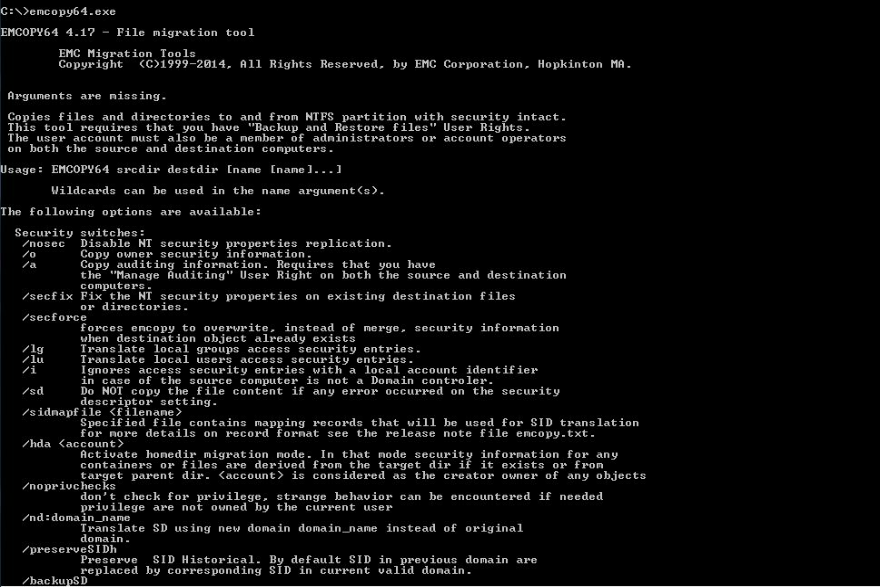
emcopy version 4.17 supports converting old historical SID to new SID using sidmapfile switch, This is a great feature for CIFS/SMB migration especially that we can now convert all the old broken SID’s to new active SID’s while we are executing the emcopy file migration. In this exercise we will demonstrate how to construct the sidmap file and execute the emcopy command using the SIDmapfile switch.
sidmapfile format:
Below is the help file that is attached with the sidmapfile:
Anything that starts with "#" is a comment #this file is read by emcopy when option /sidmapfile is specified
#each line is a single mapping record which leads emcopy to replace the sid source by the specified sid
#There are four different types of record supported:
#SID_TO_SID, record format is: :
#HSID_TO_HSID, record format is: :
#ENUMTYPE, record format is:
"","","","" Note: and are not used by emcopy.
#ISI_RECORD, record format is: ,:,,:
#There is no limitation of record type directive
#A record type directive can be followed by several records
In this exercise we will construct an SIDmap file that will transfer all the Windows “Local Administrator Group” to an Active Directory “Global Group” The following scenario will be used:
Migrate an SMB directory called d:\migrationdirectory01 from a local windows machine called “WindowsHost01” to a new Isilon Cluster called “IsilonCluster01”.
Local Machine Name: WindowsHost01
Directory to migrate: D:\migrationdirectory01
NTFS permissions on the D:\migrationdirectory01 directory
Administrators (Local Group)
System
Owner rights
change the “Local Administrators” group to new Active Directory domain global group called “Isilon_Global_Group”
First we need three variables for the SIDmap file
The old “Local Administrator Group” SID, this group will not be transferred to the new file server
The new “Active Directory Global Group” SID that will replace the old Local Administrator Group SID
The old local host name
First step: (Identify the local and global groups SID)
Local Group SID
Open powershell in local windows machine and type the following:
The above command line will replace every ACL record with built-in “Local Administrators” group to new SID “Isilon_Globl_Group”
Automating the batch file
To make the script more automated and run emcopy several times incremental without keep changing the name of the log file for each run, edit the batch file and add the following:
@echo off
for /f “tokens=2,3,4 delims=/ ” %%i in (‘date /t’) do set vardate=%%k_%%i_%%j
for /f “tokens=1,2 delims=: ” %%i in (‘time /t’) do set vartime=%%i_%%j
set varlog= SIDWindowsHost01log_%vardate%_%vartime%.log
I have more than 15 years hands-on experience in the IT field. The majority of my work is in networking, operating systems and applications and storage. I carry industry certifications in Redhat, Microsoft, EMC, VMWare, VCE and ITIL.
I find it hard to find procedures or documents on how to implement specific technology and this is how the decision to create a place to share my knowledge and ideas for anyone interested in the same subject.
If you have the same vision and you are interested to publish on this website please contact me and I will create an account for you.
This site is targeting Solution Architects, Implementation Engineers and Systems Administrators. It is not targeting sales or intending to promote any specific technology or vendor.
The focus is on hands-on work, technical documentations and architecting solutions.
The site reflects my knowledge and opinions, I do recommend that you test what you learn in the lab environment before implementing it in production.
If you have a doubt call technical support, I do not assume any liability for any errors or omissions in those articles, I also make no representations as to the accuracy or completeness of any information on this site or found by following any link on this site
Content published here is tested in my own lab and is not reviewed or approved by any vendor.
If you have any issues with your system I highly recommend you contact the technical support of the vendor.
Disclaimer
Knowledge Ascent (KA) makes information available on its web site to enhance public knowledge and promote a better understanding of the IT environment. KA attempts to provide accurate, complete, and timely information. KA, however, cannot guarantee the quality, content, accuracy, or completeness of the information, text, graphics, links, and other items contained on its web pages because the material comes from a variety of sources, collected and maintained for different purposes. KA also retains the right to change any content on its web site without prior notice.
Information provided on the KA web site should not be used as a substitute for IT or other professional advice. KA assumes no liability for any damages or loss of any kind that might arise from the use of, misuse of, or the inability to use the KA web site and/or the materials contained on the web site. KA also assumes no liability for improper or incorrect use of materials or information contained on its web site. All materials that appear on the KA web site are distributed and transmitted "as is," without warranties of any kind, either express or implied, and subject to the terms and conditions stated in this disclaimer.